BLOG ARTICLE
Why Is My Website Slow? 7 Common Causes and How to Fix Them
October 14, 2026
Why is my website slow?
A slow website can frustrate visitors, reduce engagement, and make it harder for potential customers to explore your products or services.
The problem could be large images, slow hosting, excessive code, or other performance issues.
Before making changes, test your website to identify what might be causing the problem.
Test your website speed for free: Google PageSpeed Insights
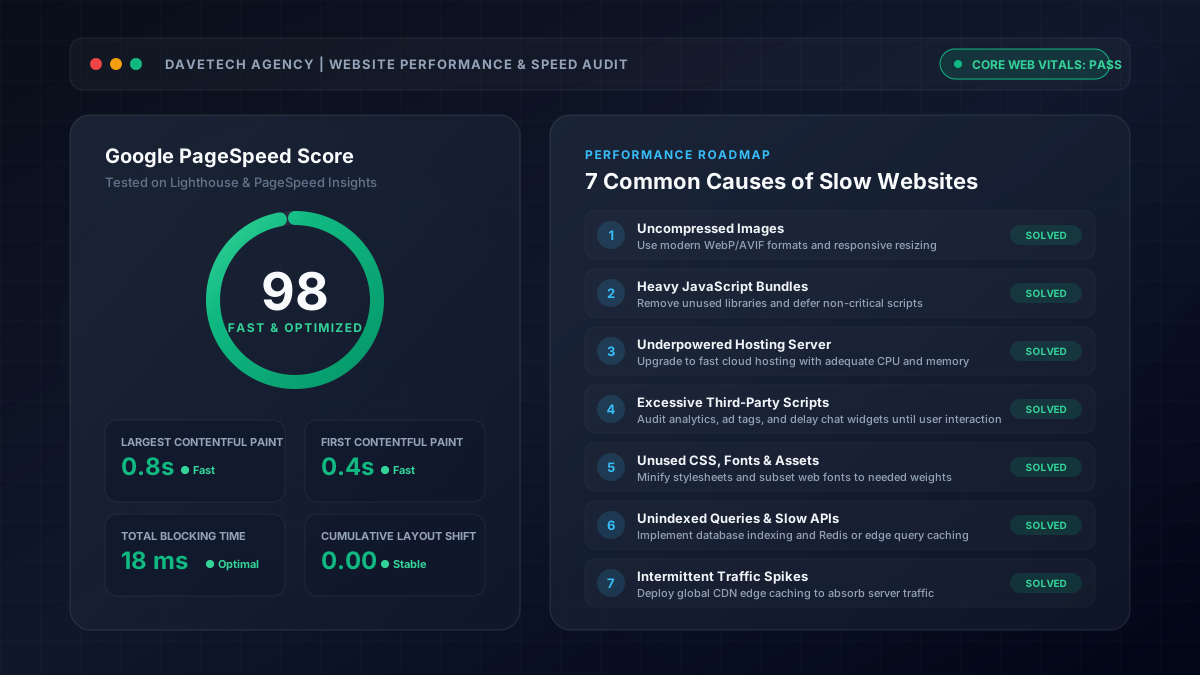
7 Common Causes of a Slow Website and How to Fix Them
1. Large Images
Large image files take longer to download, especially on slower internet connections.
Fix: Compress images, resize them appropriately, and use modern formats such as WebP where suitable.
2. Too Much JavaScript
Excessive JavaScript can delay page loading and make your website less responsive.
Fix: Remove unnecessary scripts and load features only when needed.
3. Slow Website Hosting
Your server may take too long to respond because of limited resources, heavy traffic, or inefficient application code.
Fix: Investigate the cause before upgrading your hosting plan.
4. Too Many Third-Party Scripts
Analytics tools, advertisements, chat widgets, and tracking scripts can affect website performance.
Fix: Remove unnecessary tools and delay non-essential scripts where appropriate.
5. Too Many Website Resources
Large CSS files, unnecessary fonts, animations, and duplicate libraries can increase loading time.
Fix: Remove unused resources and optimise those needed to display your website.
6. Slow Database or Backend
Websites that rely on databases, APIs, booking systems, or dynamic content may become slow when requests take too long.
Fix: Investigate slow queries and unnecessary requests.
7. Intermittent Performance Problems
If your website is sometimes fast and sometimes slow, the cause could be server overload, network conditions, caching, or third-party services. Test at different times to identify patterns.
Not sure what is slowing down your website?
[send me your website] and I'll run a complete speed diagnostic to identify what's hurting your performance.
How to Fix a Slow Website
Start by testing the affected page using Google PageSpeed Insights. Review the recommendations, identify the biggest bottlenecks, and apply the appropriate fixes.
Test again after making changes to determine whether performance has improved.
Regular checks can help catch speed issues early. Brooklyn businesses can also use this website maintenance checklist to review other common problems.
Does Website Speed Affect SEO?
Website performance contributes to user experience, and Google's Core Web Vitals measure important aspects of loading, responsiveness, and visual stability. However, improving speed alone does not guarantee higher Google rankings.
The key is to identify the actual problem, fix it, and measure the results.
Want to speed up your website and get more enquiries?
If your website is slow or losing visitors, send me a DM — we'll optimize your site for lightning-fast speeds and higher conversions.